
Typically on the task list, tasks will only show if they are outstanding items to be completed. If you would like to view completed tasks, you will need to apply a filter to your list by following the below:
- Open your Task List within CCH Central;
- On the top-left hand side of the task list, you will find some blue text labelled No Filter, or you will see some filter which has been applied previously. Click on this text;
- Create a filter which looks like the below image, and select Apply.
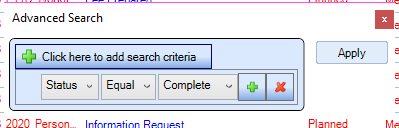
If you would like to see tasks which have been completed that day, add an additional filter by selecting the green cross and ensure the following has been created:
- Status = Complete
- Completed Date = Date of the day you want to see
Again, ensure to select Apply when you have created your filters.