
You can send a message to multiple clients on CCH OneClick, with the details of names etc changing based on the client via Mail Merge. to use the function, please do the following:
NOTE: Messages MUST be set up as a template to be able to be used via Mail Merge.
- Select the clients whom you would like to send out a message to via the Find Clients tab;
- Select Mail/ Email Merge at the top of the screen;

- Select Publish to CCH OneClick on the drop-down list named Output Selection, and click Next;
- From here, select the template message which will be used in the mass communication to your selected clients, and click Next;
- Click Next until you reach the grid with your selected clients showing (Stage 5 of 6 showing on the top left of the window);
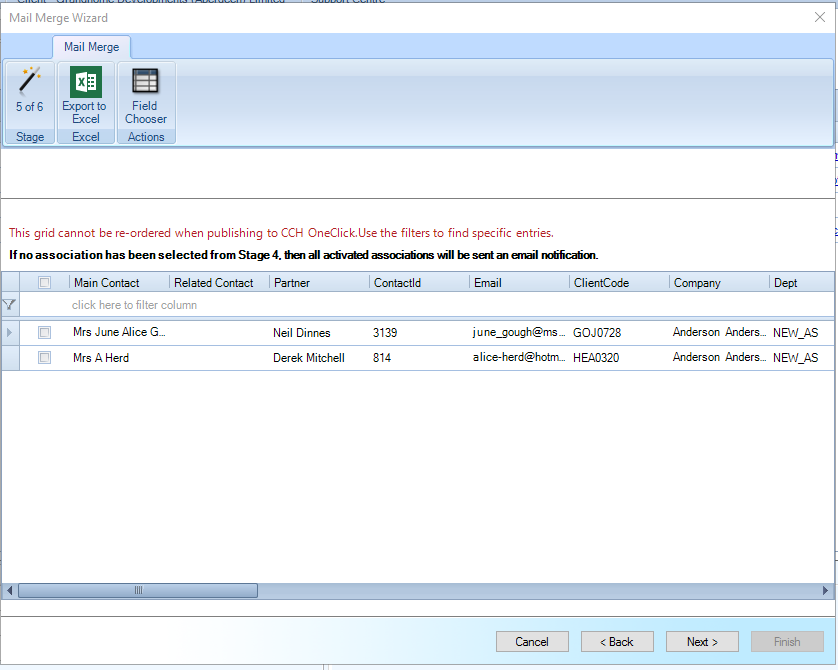
- Pick the clients whom you wish to send the message to, click Next then on the final screen, click Finish.
It will take a short moment to send these messages, based on the number of clients you are sending messages to, so please be patient if CCH is loading for a couple minutes after you have done the above.